Status: draft | Audience: anyone designing, building, or reviewing the tracking panel | See also: README, Audio.md, Video.md, Personas.md, ../development/TechStack.md
Tracking
Live flight tracking is the third pillar of the Airshow Traffic Monitor, alongside ATC audio (Audio.md) and the YouTube video grid (Video.md). This document covers why the tracking panel exists, what it does, where it is fragile, and what "working" looks like once it ships.
Intent
The tracking panel exists to give the operator — see Personas.md — the live traffic picture: watching the arrival conga line form over Ripon–Fisk, departures flow outbound, and holds develop once the field saturates. It is the map view that completes the other two pillars: audio (Audio.md) is the ears, the video grid (Video.md) is eyes-on-field, and the map ties aircraft positions to what is being heard and seen. During AirVenture the sky picture changes minute to minute; the panel exists so the operator watches that change happen, rather than reconstructing it after the fact.
Today this picture lives in its own browser window on a dedicated monitor, signed into a paid account and centered on Oshkosh — see the current map view in the prototype screenshot. The tracking panel folds that window into the unified dashboard without losing what makes it useful: full interactivity with the live site itself (today, FlightRadar24).
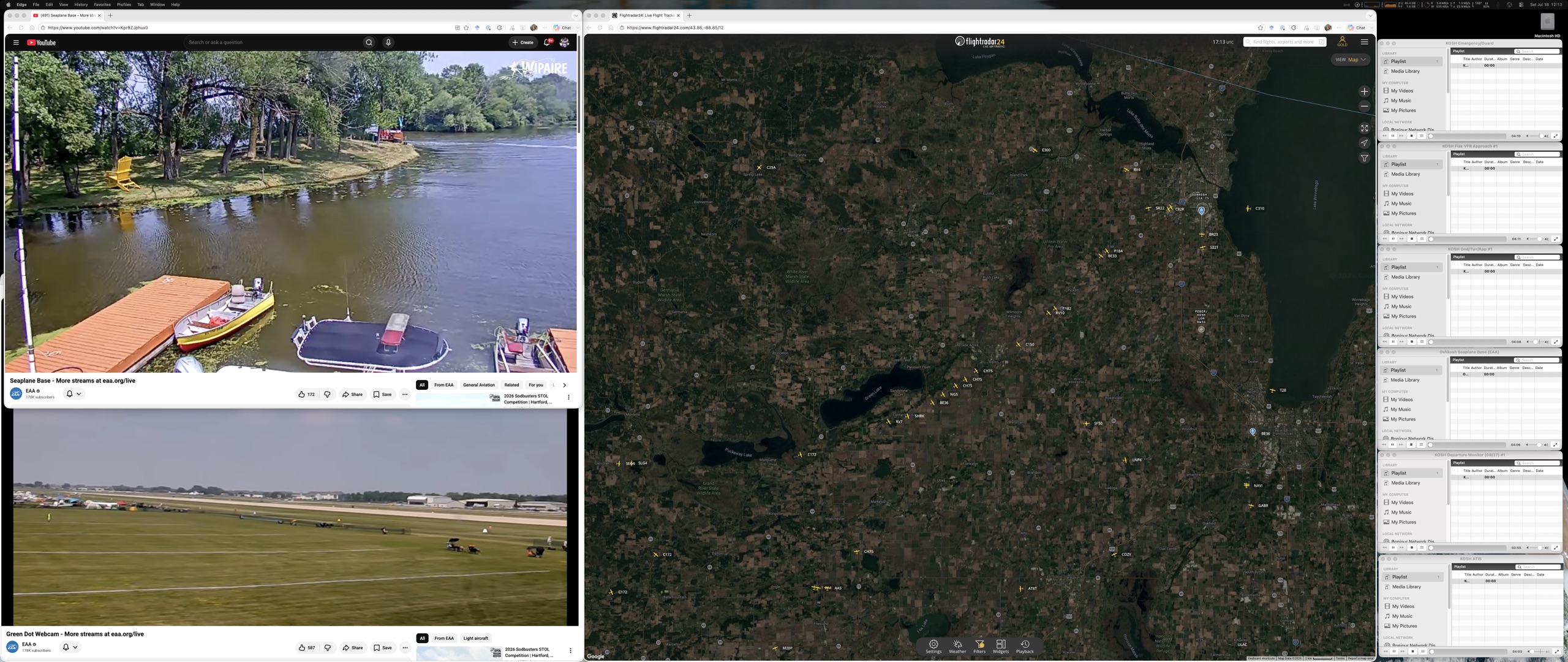
Features
- A genuine embedded browser, not a lightweight embed.
The tracking site refuses the lightweight embedding a page normally uses to host another page inside itself — verified directly against the live site (decision 2026-07-18).
The panel is instead a real, independent browser context: pan, zoom, click an aircraft, apply a filter — all of it behaves exactly as it does in a normal browser tab, because it is one.
The panel provides full browser capabilities essential to the tracking experience:
- Session persistence: cookies and localStorage are preserved across app relaunches, so login state and user preferences (filters, saved views) survive restarts.
- JavaScript execution: the tracking site is fully dynamic; all interaction is driven by JavaScript, not static HTML.
- Full DOM access: clicking an aircraft, submitting filters, dragging the map, and every other interaction work as they do in a browser.
- Navigation: back, forward, and address bar state are available for the operator to reverse changes or see where the panel is pointing. Implementation detail: ../development/TechStack.md.
- Free and paid accounts both work. The panel works with a free FlightRadar24 account, so casual spotters can monitor traffic without subscribing. Premium features (if the operator has a paid account) are available in the panel the same way they are in a browser — no special plumbing needed. This is a feature of the tracking site itself, not the app; the app makes no distinction and does not promote one tier over another (decision 2026-07-18).
- Sign in inside the panel. The operator logs into their FlightRadar24 account by signing in through the browser panel itself, the same way they would in an ordinary browser tab. TODO: confirm during development whether the login session is inherited from a prior system-browser login, or whether it must be entered anew in the panel. This will affect the sign-in UX and first-launch documentation.
- Minimal navigation. Back, forward, reload, and home — home being a preset view centered on Oshkosh — cover what the operator needs mid-show (decision 2026-07-18). The address is shown read-only: enough to see where the panel is, not an invitation to type a new destination.
- Sign in once. The panel's session persists across app relaunches, so the operator's paid-account features stay available without logging in again each morning (decision 2026-07-18). The last map view — position and zoom — restores automatically on launch too, nearly for free: the site encodes view changes into its own address, so remembering the address is enough to remember the view.
- Resizes on its own terms. Per the original requirements (README), the tracking panel is sized and emphasized independently of the video grid: dragging it larger or smaller never reflows the YouTube tiles, and emphasizing a grid tile never touches the panel.
- Muted like everything else, visibly. The panel can carry sound, and it follows the same app-wide contract as every other source: a mute control plus a visible indicator of whether it is currently making noise (see Audio.md). Unlike the ATC streams, it gets no per-source volume, no output routing, and no activity analysis — mute plus an on/off activity signal are all this source needs.
- Pop-ups declined, external links escape. Anything the tracking site tries to open in a new window is declined inside the panel. Links that need to leave the app entirely — help pages, account pages — open in the operator's system browser instead.
Risks and known limitations
- Anti-automation challenges. Sites like this routinely challenge traffic that looks automated. The panel avoids tripping that check the way an ordinary visit would: it identifies as a normal browser, and because its session persists, a challenge passed once tends to stay passed. If a challenge appears anyway, the panel is a real, interactive browser context, so it can be completed by hand like anywhere else. If the panel is ever blocked outright, the fallback is signing in through the operator's own system browser instead.
- The site can change without notice. The tracking website is someone else's product. A redesign can move controls, stop encoding the map view in the address (breaking last-view restore), or alter the page in ways this app doesn't control. Because the panel is a real browser rather than a scraped or reconstructed view, the app degrades gracefully when that happens — the site may look different, but the panel keeps working rather than breaking outright.
- Overlays must stay on top. The panel renders as a layer above the rest of the interface. Standing layout rule: every app menu, dialog, and overlay must appear above the tracking panel — never trapped beneath it — and this has to hold for overlays added later, not only the ones that exist today.
- This is one person's normal, logged-in use of a consumer website. The panel does not scrape data, automate interactions, or run multiple sessions. It is a single logged-in session, driven by hand, exactly as if the operator had opened the site in an ordinary browser tab — no more.
- One tracking panel in the alpha. Only one instance of the panel exists. Multiple simultaneous tracking views — one pinned wide, another zoomed on a specific approach — is a possible future direction (planned, not built).
Expected outcomes
- Sign in once, quit the app, relaunch days later: still signed in, and the map opens at the position and zoom it was left at, not some default view.
- Drag the divider between the tracking panel and its neighbors: the map's edge tracks the divider at any size, with no gap and no flicker.
- Open any app menu or dialog while the tracking panel is visible: it always appears above the map, never behind it.
- Click home: one click returns the map to the standard Oshkosh view, regardless of where it had wandered.
- Click an aircraft, apply a filter, pan, zoom: every interaction works exactly as it would in a normal browser tab, because it is one.