Status: draft | Audience: anyone designing or building audio behavior in the app | See also: Video.md, Tracking.md, Personas.md, ../development/TechStack.md, README
Audio
This document specifies every sound source in Airshow Traffic Monitor: the ATC radio streams, the audio that comes with the YouTube video feeds, and the audio the flight-tracker browser panel can make. It is written in product terms; where a mechanism is load-bearing it links to ../development/TechStack.md rather than naming the machinery here. Audio is the app's hardest and most important part — listening to Oshkosh is where monitoring breaks down first, so the audio system is designed around that failure.
Intent
During AirVenture the tower at Oshkosh (KOSH) works one of the densest traffic loads anywhere, spread across several radio frequencies at once. The manual prototype this app replaces ran six separate media players stacked in a single column — one per frequency — alongside a browser and about five webcam tabs across two monitors.
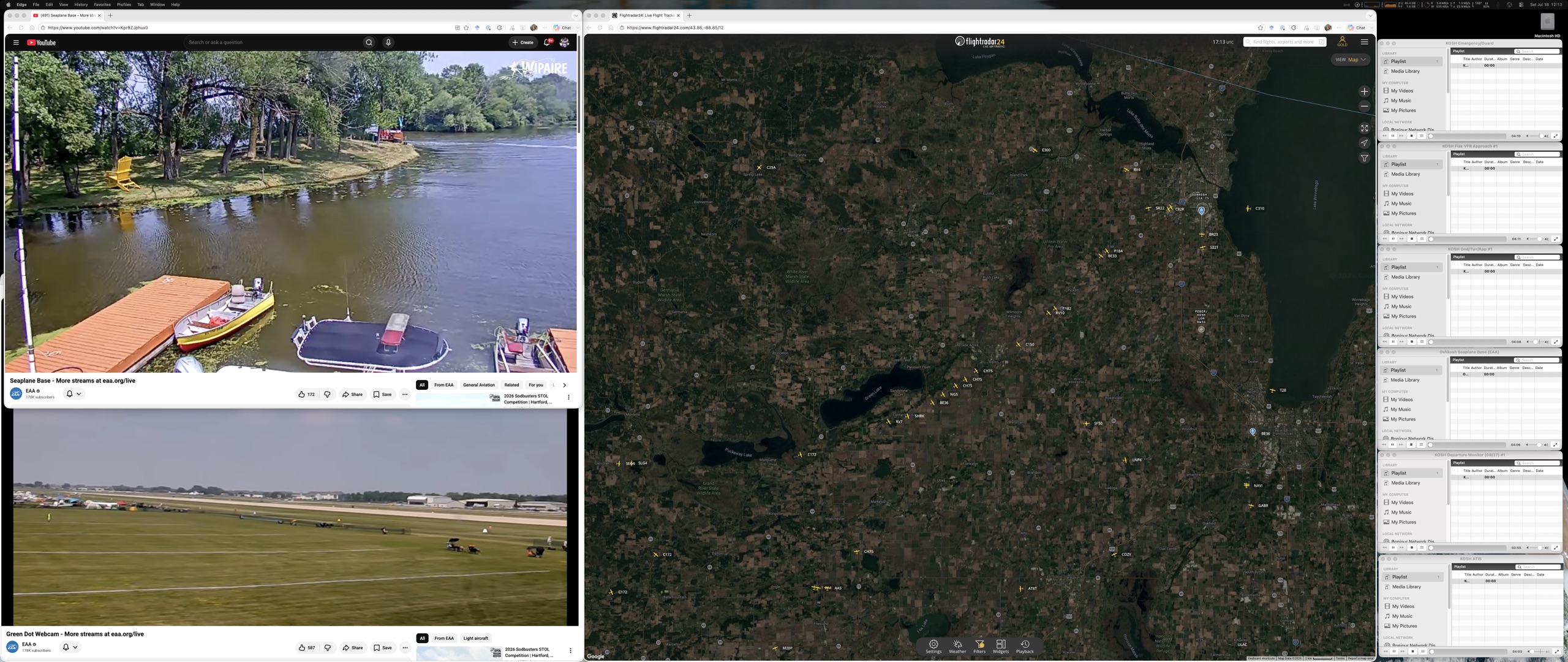
Several live radio streams are fine while only one channel is talking. The moment calls overlap across channels — routine at Oshkosh — the combined audio becomes unintelligible, and, worse, the operator cannot tell which stream a given call is coming from. That is the core problem the README names, and the whole audio system exists to answer it three ways:
- Show who's talking at a glance. Every ATC channel carries an activity light driven by its live signal, so the operator can look instead of straining to pick one voice out of the wall.
- Let the important channel win automatically. A priority ranking ducks lower-priority chatter underneath higher-priority calls, so Tower cuts through Fisk with no one touching a control.
- Let the operator take manual control instantly. One click solos a channel; mute, volume, pan, and per-stream output routing are always one gesture away.
The operator arranges audio once — a curated set of KOSH frequencies with sensible priorities ships in the box — and then just watches and listens. See Personas.md for who is doing the watching; the audio surface spans all three, from the Casual-Spotter who only wants a couple of channels and a mute button to the Command-Center-Enthusiast running the full priority-and-routing setup.
Features
The unifying principle
Every sound source in the app can be muted, and the app shows each source's audible state as far as that source permits it to be seen. Muting is universal. Activity visibility is full for ATC streams, coarse for the tracker panel, and — honestly — absent for video feeds, because their embedded players expose no live sound-level signal. Only ATC streams get the full control set beyond mute: volume, stereo pan, priority ducking, solo, and per-stream output routing. The app commits to those four ATC behaviors — activity lights, one-click solo, stereo pan, and priority auto-ducking (decision 2026-07-18).
| Capability | ATC streams | Video feed audio | Tracker panel audio |
|---|---|---|---|
| Mute | Yes | Yes | Yes |
| Activity visibility | Signal-level, per channel; keeps working while muted | None — embedded player exposes no live sound signal | Coarse: making-sound / silent |
| Per-source volume | Yes | Yes | No |
| Stereo pan | Yes | No | No |
| Priority auto-duck | Yes | No | No |
| One-click solo | Yes | No | No |
| Output-device routing | Per stream | System default only | System default only |
The two "bounded" columns are not oversights; they are the honest ceiling of what the app can do with audio it does not itself play. Their causes are recorded below and in Video.md and Tracking.md.
ATC streams — full treatment
- Per-stream volume. Each channel has its own volume, independent of every other.
- Mute that keeps the light alive. Muting a channel drops what you hear to zero but never stops the app from watching it — so a muted channel's activity light still shows it talking. This is deliberate and is exactly what the README asks for: you mute a channel you don't want in your ears right now, yet still want to see the moment it comes alive so you can bring it back. (Mute lowers the channel's own volume to zero; it does not silence the analysis feeding the light.)
- Activity lights. Each channel's light is driven by adaptive, squelch-aware detection: the app measures the stream's live signal level (via the runtime's audio graph) and learns each channel's own noise floor, lighting only when a real transmission rises above it. Short gaps between overlapping words don't drop the light — a brief hang time bridges the un-key/re-key between transmissions so the light doesn't flicker mid-call. The detection thresholds live in the configuration file, so they can be tuned at the show without touching code — the work of the Programmer-Aviator on day one.
- Stereo pan. Each channel can be placed left-to-right in the stereo field. Spreading channels apart is one of the cheapest ways to make two simultaneous calls separable — the ear tracks two voices from different directions far better than two from the same point.
- Priority ranks with auto-ducking. Every channel has a priority rank. A channel ducks only when a channel of strictly higher priority is active — equal ranks never duck each other. A muted higher-priority channel does not duck the channels below it (decision 2026-07-19): its activity light still shows it talking, but because the operator has taken it out of their ears, ducking the channels they are listening to on its behalf would drop the mix to silence for a voice no one can hear. When a channel ducks, it drops to −12 dB, with a fast duck and a slow release, so a priority call's opening syllables aren't buried under a channel still fading down, and a channel coming back up doesn't pump (decision 2026-07-18). The result: Tower talks and Fisk quietly steps back within a fraction of a second, then eases back to full on its own.
- One-click solo. Solo overrides everything — priorities, ducking, and mutes — collapsing the mix to a single channel instantly, and releasing back to the prior state just as fast. It is the operator's manual override when the automatic logic isn't what this particular moment needs.
- Per-stream output device. Any channel can be sent to its own output — for example, Tower to headphones while everything else plays on the desk speakers (decision 2026-07-18). This is the Command-Center-Enthusiast's way of keeping the one channel that matters physically separate from the ambient wash of the rest.
- On-demand connection — the operator chooses what streams. Streams start disconnected: the app opens with no channel pulling audio, and a disconnected channel does no network activity at all. The status indicator on each channel doubles as its connect control — click it to connect that channel, click it again to disconnect (decision 2026-07-19). This replaced an earlier "auto-connect everything at launch and reconnect forever" model, which, at AirVenture prep, hammered event-only feeds that were not broadcasting yet and alarmed the operator with channels stuck endlessly retrying. The operator still arranges audio once: the set of connected channels is remembered and restored on the next launch, so a curated arrangement comes back on its own (the restored channels reconnect a beat apart rather than all at once, to stay a polite guest of the stream host).
- Automatic reconnection for connected channels, with a calm floor. Once the operator connects a channel, a dropped or stalled stream reconnects on its own without them noticing or acting — but only a channel the operator asked for reconnects; a disconnected one stays quietly off. Reconnection is quick at first, then eases off: after several failures in a row a channel stops climbing a retry counter and settles into a slow, steady retry shown as a calm "feed down" state instead of an ever-climbing alarm — a mount that is simply not on the air yet should not look like a crisis (decision 2026-07-19). Clicking a channel's control always forces an immediate fresh attempt, so the operator can retry the instant a feed is expected to come up rather than waiting out the slow cadence.
- Health is shown by a status indicator separate from the activity light — disconnected, connecting, live, reconnecting, feed-down, or error. The two are distinct on purpose: a channel that is live but silent (a squelched frequency with no traffic) is normal and can stay that way for minutes, so silence must never read as a fault. The activity light answers "is anyone talking?"; the status indicator answers "is this channel connected, and is it healthy?"
Stream source: LiveATC (alpha release).
For the alpha release, streams are sourced from LiveATC, which provides .pls playlist URLs for Oshkosh frequencies via the Oshkosh search.
The app resolves these URLs to their underlying stream addresses when a channel is connected (not at startup — nothing is fetched for a disconnected channel) and caches them; this supports the architecture constraint that stream hosts block non-browser clients (the app presents itself as a browser when resolving addresses).
Future releases may add other stream sources (SDR, TuneIn, direct server URLs) through a pluggable stream-source layer; the alpha commits only to LiveATC and the frequencies listed below.
Curated KOSH defaults. A ranked set of Oshkosh frequencies ships baked in, sourced from LiveATC, so the app is useful the moment it opens:
| Rank | Channel | LiveATC Source |
|---|---|---|
| 1 (highest) | Emergency / Guard | LiveATC OSH |
| 2 | Tower | LiveATC OSH |
| 3 | Fisk VFR Approach | LiveATC OSH |
| 4 | Ground / Tower | LiveATC OSH |
| 5 | Departure Monitor | LiveATC OSH |
| 6 | Seaplane Base | LiveATC OSH |
| 7 (lowest) | ATIS | LiveATC OSH |
ATIS (rank 7) is a continuous recorded loop, not live chatter, so its activity light would be on nearly all the time and it never truly "goes quiet." It therefore ships low-volume or muted-with-light: its light shows it looping, but at the bottom of the ranking it never ducks anything and never competes for attention.
Managing channels from the panel. The curated defaults are a starting point, not a ceiling — the operator builds their own channel set in the panel, no file editing required (decision 2026-07-19). An add-channel action opens a dialog listing an airport's feeds from the LiveATC directory; the airport is a plain station code, so the same flow works beyond Oshkosh. Feeds already on the panel are shown but disabled, so "what can I add?" and "what do I already have?" read from one list; a newly added channel joins at the bottom of the ranking, disconnected, so adding one never disturbs the running mix. Because that directory sits behind an anti-bot gateway that can refuse automated access at any moment, a bundled snapshot of the Oshkosh feeds is the fallback when the live lookup fails — the operator can always add a KOSH channel even with the directory unreachable, though the snapshot cannot report which feeds are broadcasting right now (decision 2026-07-19).
Priority is the list order. The channel list reads top-to-bottom as highest-to-lowest priority, and the operator sets priority by dragging a channel up or down (rank 1 is the top); the same reorder is available from the keyboard for accessibility. Priority stays owned by the config file rather than the per-session state, so it is re-derived on every launch and a hand-edit and a drag are the same edit to the same place (decision 2026-07-19) — see ../development/TechStack.md. A channel can also be removed from the panel; it stays in the directory and can be re-added at any time, and the last channel cannot be removed (the panel is never empty).
Video feed audio — bounded
The YouTube video feeds carry audio, but the app plays them inside embedded players it does not own the internals of, so the audio contract is deliberately small: per-feed volume and mute, and nothing else. Video audio always plays on the system default output; it cannot be routed to a specific device, cannot be panned, cannot join the priority-ducking mix, and cannot drive an activity light — the embedded player exposes only volume, mute, and play/pause, never a live "sound is coming out right now" signal, and a live feed reports "playing" continuously even while silent. This is the honest ceiling, not a deferred feature; its cause (the app hosts these feeds through an embedded player rather than playing them itself) is detailed in Video.md and ../development/TechStack.md.
Tracker panel audio — bounded
The flight-tracker browser panel can occasionally make sound (alerts and the like). Because the app hosts that panel as a full browser view it controls directly, it can do two of the audio contract's parts: mute the panel, and show a coarse making-sound / silent indicator — so even the tracker meets the mute-and-activity floor. It gets nothing finer: no per-source volume, no routing, no signal analysis, no pan, no ducking, no solo. See Tracking.md for the panel itself.
Risks and known limitations
- Overlapping-call intelligibility is the product's hardest problem, and may never be fully solved. No single feature fixes it; the design layers four partial answers — activity lights (see who's talking instead of parsing it by ear), priority ducking (thin the overlap automatically), stereo pan (separate voices in space), and solo (collapse to one when all else fails). Stacked, they make dense moments monitorable; they will not make every simultaneous three-way call individually intelligible, and the design does not pretend otherwise.
- Stream hosts vary in cross-origin openness. Lighting a channel's activity requires reading its signal, which requires the host to allow cross-origin access. The KOSH mounts are verified open today. For any mount that isn't, a contingency relay (a small pass-through the app can route that one stream through) is designed but not built — planned, not built; see ../development/TechStack.md.
- Stream hosts block clients that aren't browsers. The stream provider rejects fetchers that don't identify as a web browser (verified). The app presents itself as a browser when it looks up stream addresses, and caches resolved addresses rather than re-requesting them aggressively.
- Audio devices unplug mid-session. If an output a channel is routed to disappears (headphones pulled, dock removed), that channel falls back to the system default output and the operator is told, rather than going silently dead.
- Wireless outputs lag wired ones. Bluetooth and other wireless outputs run roughly 150–300 ms behind wired outputs. Routing one channel to wireless and another to wired means the two will not be time-aligned; the operator picks routing with that in mind.
- Long-running audio can be suspended by the platform. The operating system or runtime may throttle or suspend audio for a window left running for days. A watchdog re-arms playback so streams don't silently die, and the main window is kept from being background-throttled.
- ATIS loops forever. Because ATIS is a continuous recording, its activity light is on nearly always and it never falls silent. Its default treatment (lowest priority, low-volume or muted-with-light) keeps it from competing or ducking anything while still showing it's looping; see the curated defaults above.
Expected outcomes
These are the observable acceptance criteria for the audio system — the exit conditions for its build phases in ../Implementation-Plan.md:
- The app opens with every channel disconnected; the operator connects channels by clicking their status controls, and the connected set is restored on the next launch.
- Six or more ATC streams play at once and stay coherent enough to monitor together.
- Every activity light matches what the ear hears — including muted channels, whose lights keep working while their audio is off.
- A higher-priority call audibly ducks lower-priority streams within about 200 ms and releases smoothly afterward, with no pumping.
- Network loss self-heals unattended for connected channels: pull the connection and restore it, and every connected stream returns to live on its own, with no operator action; a channel that stays unreachable calms into a "feed down" state rather than an ever-climbing counter.
- One stream plays on headphones while the rest play on speakers.
- Detection thresholds are tunable without code changes — edited in the configuration file at the show, no rebuild.